Brand kits, editing skills and studying a video you love.
Make a brand kit
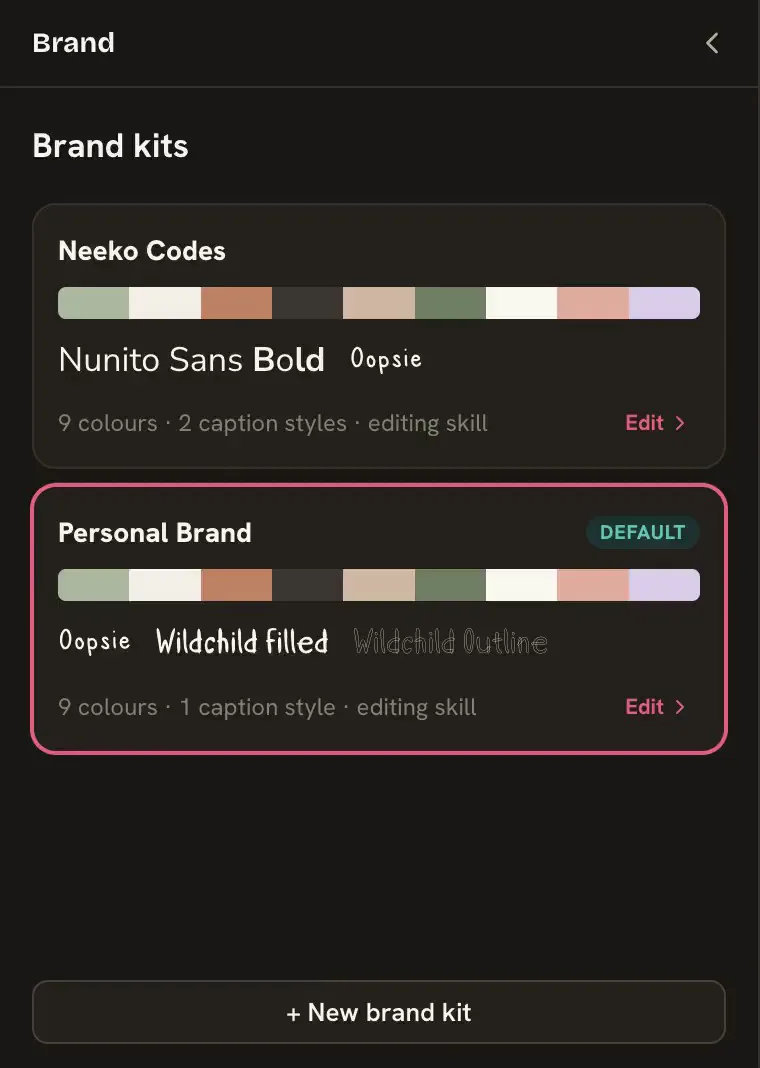
Open Brand on the left rail, choose New brand kit, name it and pick a starting point. A kit keeps your colors, fonts, caption styles and editing skill together, so every new project starts on-brand.
Choose Brand at the bottom of the left rail, then + New brand kit.
Type a Name and pick a Start from: Clean and simple, Fun and personality, Bold and high energy, Soft and story or Empty. A starting point brings colors, fonts, a caption style and an editing skill.
Choose Make kit. Your first kit becomes the default for new projects.
Screenshot coming soon
The Brand panel.
What a kit holds
Colors and Fonts, which you add, change or remove.
Graphics look: Statement font, Simple font, Text, Accent, Card and Card text. Text, graphics and the built-in caption looks use these by default.
Captions: saved caption styles. Use Save to brand in the caption settings.
Open a kit’s ⋯ menu for Rename, Default for new projects and Delete kit…. Deleting asks first, and projects that use the kit keep their colors, fonts and captions.
Put a project on a brand kit, and update it
In Brand, click a kit card to put the open project on it. A project keeps its own copy, so changing a kit never surprises an old project; choose Update when you want the newer version.
Open the project and choose Brand.
Click a kit card (its tooltip is Use for this project). The project gets the kit’s colors, fonts and first caption style.
If the kit changes later, the project shows This project has an older version of …. Choose Update to bring the project up to date.
Or ask your agent
You
Put this project on my Sunny Days kit.
Write or change an editing skill
An editing skill is a short Markdown text on your brand kit that tells your agent how you like to edit. Change it in the window, or just ask your agent.
Yapp Studio has no editing settings of its own. Your agent edits with your kit’s skill and nothing else, so one place decides how fast, how busy and how loud your videos feel.
In the window
Open Brand, then your kit, and find Editing skill. Choose Edit ›. With none yet it offers Start from an example… and Write my own.
Edit the text. A skill is a title, one line saying what it is for, then the method in any shape. It can be up to 100,000 characters.
Choose Save. ⋯ offers Start from an example… and Remove editing skill….
With your agent
Or ask your agent
You
From now on, always use plain captions and never zoom more than once a minute.
Anything you say as lasting ("from now on", "always", "never") goes into the skill, in your words, and your agent tells you where it saved it. One-off fixes do not.
The four examples
Example
Good for
Clean and simple
Calm and uncluttered: explainers, how-tos, quiet expertise
Fun and personality
Lively and playful: jokes, storytime, character
Bold and high energy
Fast and packed: hot takes, tips, fast lists
Soft and story
Gentle and unhurried: personal stories and reflection
Study a video you love
Give your agent a video file and ask it to study the editing. It measures cuts, zooms, text, sounds and words on your Mac, shows you frames, and says what works and why.
Save the video to your Mac. If you only have a link, save it or screen-record it first.
Tell your agent where it is: "Study this reel and tell me what makes it work."
Your agent lists the editing tricks it found, grouped by part of the edit, with when they happen. You pick the ones you want.
It saves your picks into your kit’s editing skill (without the times, which belong to that video), or uses them for one edit only.
Studying measures the file on your Mac: length, words with times, cut rate, punch-ins, text coming and going, loudness and where sounds hit, plus a sheet of labeled frames. It can look at up to 10 minutes, and the first study takes a little while. It needs the speech model from Getting Yapp ready.